
On this page, you find the ultimate guide to the WWE 2K26 MyGM Mode, with all the features explained, tips and tricks, and everything you need to know to win the battle of the brands, either locally or online.
WWE 2K26 MyGM significantly expands strategic depth - with longer seasons, more match types, custom championships, double-booking, advanced AI difficulty, and more interactive mechanics.
Here we'll go through all the details and available options, including how to start the mode, the MyGM Draft, how to manage your Budget, Roster, and Show Logistics, how to book your Shows, Commissioner Goals, Power Cards, Ratings, and much more.
If you're curious to know how WWE 2K26's MyGM stacks up against the GM Mode from classic SmackDown vs. Raw games, check out our Side-by-side table comparing MyGM and GM Mode, with all pros and cons.
WWE 2K26 MyGM Guide Index
What is MyGM Mode in WWE 2K26?
MyGM immerses players in the role of a WWE General Manager, allowing them to draft a roster, manage budgets, sign free agents book matches and rivalries, choose arena locations, production elements, and more, with the goal of beating a rival GM in weekly rating battles.
To win GM Mode, your goal is to have the best brand by the time of Wrestlemania, whether you're competing against the AI or a friend. Whoever has the most popular show at the end of the season wins.
The default season length is now 50 weeks, providing a much longer marathon to build stars and legends.
The final goal of MyGM Mode in WWE 2K26 is not only to win the battle of the brands, but also to win Trophies and be inducted into the Hall of Fame.
WWE 2K26 MyGM: How To Play
Play Locally or Online
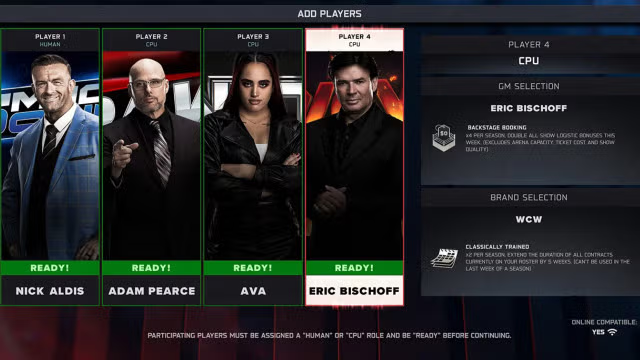
MyGM allows you to play against AI, against local human players, or with actual online multiplayer for up to four players. When setting up the mode, you can decide whether to play locally (offline), or to play against friends with an online connection.
When playing MyGM online, the host can invite up to 3 other friends to play together online simultaneously. This allows all players to book their show and play at the same time on their console, without having to wait for other people's turns.
An online save slot can also be continued to be played locally if you and your friends happen to get in the same location. However, if you play MyGM Online, the following features are disabled:
- Custom GMs
- Custom Rosters
- Playing Matches
- Spectating Matches
Choose Your General Manager(s)
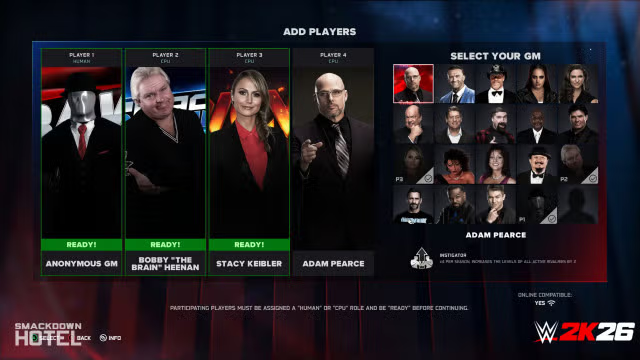
The first big choice will be deciding which GM you'll play during the course of the mode. Up to 4 players can join the mode, each controlling a different GM and a different brand.
Each GM gives you access from the start to an Exclusive Power Card, a special boost that you can use to gain advantages in your season.
Below is the full list of General Managers available for selection in WWE 2K26's MyGM:
- Adam Pearce
- Ava
- Bobby Heenan NEW
- CM Punk
- Eric Bischoff
- Mick Foley
- Miss Elizabeth
- Mr. Fuji
- Nick Aldis
- Paul Heyman
- Sensational Sherri
- Shawn Michaels
- Stacy Keibler NEW
- Stephanie McMahon
- Theodore Long
- Tyler Breeze
- William Regal
- Xavier Woods
- Anonymous General Manager NEW
- Your Created Character / Custom GM
Notes:
- Since you can use a custom GM, that means you can use a custom character downloaded from Community Creations, or even use any of the in-game superstars in the WWE 2K26 Roster if you edit them and save them as custom character slots.
- NEW You can now select Random GM and Random Brand for a more unpredictable challenge.
- NEW GMs that are playable in-game can now be drafted to the roster with no restrictions - so you can play as CM Punk as GM AND have CM Punk on your roster.
Choose Your Brand(s)
After choosing a GM, it's time to select which brand you want to manage. Just like your GM choice, the brand you select will also have a unique Power Card specific to that brand. Create a combination that will take your brand to the top!
Here is the list of available brands in WWE 2K26 MyGM, along with their starting power cards:
| Brand | Power Card |
|---|---|
| Raw | This is War Select an opposing brand to have 3 randomly selected Superstars that cannot be booked in matches next week (cannot be used before a PPV/PLE) |
| SmackDown | Birth of Legends 6 random Superstars on your roster will have their popularity increased by +6 |
| NXT | Fighting Champion Title matches booked for this week will receive a large match rating boost |
| NXT 2.0 | Fresh Meat Reduce the price of the next 3 Free Agents you purchase this week by 50% |
| WCW | Classically Trained Extend the duration of all your current Legends contracts by 3 weeks. |
| ECW | Extreme Rules Block all opposing brands from using 3 randomly selected champions in next week's show |
| NXT Mutiny (Fictional) | Ruthless Terms Collect the full contract price for the next 3 Superstars you fire this week |
It is not possible to create your custom brand in MyGM mode. However, that remains of course possible in WWE Universe mode, where you have full control over the shows.
Once you select your brand, you can then decide how many human or CPU opponents you will be competing against. You can choose to go head-to-head against 1 to 3 other brands, and you can select which brands and the GM for each.
MyGM Settings
When setting up your MyGM in WWE 2K26, you can tweak various options:
- AI Difficulty: the AI will make more intelligent choices the higher the difficulty setting (Easy, Normal, Hard, or Extreme).
- Game Difficulty NEW: this affects the number of matches on your cards, superstar morale, and injury chances. A new "Immortal" difficulty has been added.
- Win Condition: decide whether brands are ranked based on number of Fans or Hall of Fame Trophies
- Hall of Fame Trophies: select the number of trophies required to determine a winner
- Opening Budget NEW: increased options ($3M, $4M, $5M Default, $6M, or $7M) to allow for larger rosters of 20-35 superstars.
- Player Order: pick between Default / Snake / Round Robin / Reverse Rank / Random Order
- Shake Ups: decide whether shake ups are enabled during your playthrough
- Power Card Store NEW: You can disable the ability to buy cards, forcing you to earn them via goals and challenges.
- Draft Pool: determine which Superstars are available for drafting
- Auto Draft: determine whether you want to manually do the draft or let it happen automatically
- Match Unlocks: determine whether to start with all the match types unlocked from the start or not
- Booking Timer (Mins): select a maximum time for each brand to book their show (up to 15 mins)
- Timer Penalty (% fans): select if you want a penalty for brands that exceed their booking timer
WWE 2K26 MyGM Mode allows for unlimited seasons, and you can also have multiple MyGM save slots running, up to 10 at the same time.
NEW Note: The booking timer now pauses before your week starts, requiring a manual start so you can plan your strategy in peace.
Draft Pool Customization
Before you draft your Rosters, you also can edit the superstars that are available in the Draft Pool, by toggling anyone in the WWE 2K26 Roster, and also including your Created Superstars.
You can also customize the stats of each superstar before beginning, such as their starting Ring Level, Popularity, Role, Class, and Promo Skill - so you're not restricted to using the default settings for the roster. You can even determine which characters are set as Legends.
You can even save the list of selected superstars so that you can use it again for later playthroughs of MyGM mode.
In WWE 2K26, drafts now include all Superstars who are set as Active on their selected rosters - while previous MyGM iterations only used a select random pool of Superstars for the draft. This creates much larger rosters for players to leverage at the start.
WWE 2K26 MyGM: The Draft
Draft Rules
After selecting your GM and your brand, and setting up the superstars available in the Draft Pool, it's time to draft your starting roster. The WWE 2K26 MyGM Draft has the following rules:
- Each GM will start with the budget you previously set
- GMs will take turns drafting one after the other
- There are at least 9 rounds of drafting: after the 9th round, drafting becomes optional. GMs can opt-out, or continue drafting until they're out of cash.
Note: If you want to randomize things, you can also set it to "Auto Draft" in the initial settings, and let the game automatically assign superstars to the two brands.
Draft Your Roster
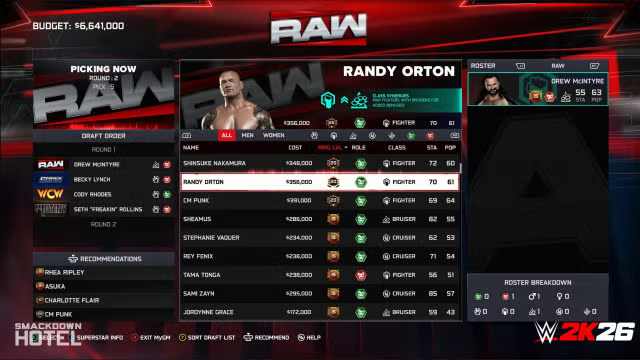
For each round of the draft, you can see a list of the superstars you can select, which can be sorted by highest or lower Popularity or Ring Level, the superstar's Cost to draft, their Class, Gender (male or female), Role (face or heel) and their Stamina. All this information is visible to help you with your choices.
You can also press the R3 button to get recommendations on who to draft or press the square / X button to get more information about a superstar. When you're selecting a Superstar, the top of the screen gives you an indication of what classes they pair well with.
Drafting a variety of different classes is important because booking matches between wrestlers of different classes will lead to higher-rated matches. The same goes for having a mix of "Fan Favorites" and "Rule Breakers" to put against each other. So keep an eye on this, and don't blindly focus just on picking top stars.
Also, managing your budget is important, as you'll need to have enough budget not only to sign Superstars and Legends but also to book Arenas and more exciting match types. You should try to draft a balanced roster without spending all your budget - or you'll risk only being able to book standard matches until you make more money.
However, you won't need to worry about choosing a contract duration for drafted superstars or deal with contract expirations - they will be permanently on your Roster.
After the 9th round of drafting, you'll enter the optional rounds, where you have the option to stop drafting and complete your draft if you want to save some money.
Once you and your rival have selected all the Superstars, a recap screen will show the starting rosters for both brands.
Choose Your Champions
After drafting your initial roster, you can select the starting Champions for your brand. Choose carefully, because title matches get a match rating boost, and champions get a popularity boost.
In WWE 2K26, you can now assign all of your champions from the starting screen. The exact available titles are different based on the brand that you're controlling.
Most brands have 5 titles available in WWE 2K26's MyGM Mode: a main Men's Championship, a main Women's Championship, a Mid-Card title, the Men's Tag Team Championship, and the Women's Tag Team Championship. The only exception is ECW which doesn't have a Women's division.
NEW In WWE 2K26, offline players can now also use Custom Championships. You can use custom-created belts, swap gender-specific titles, or use the same championship design for every slot if you wish.
WWE 2K26 MyGM: Book Show
Amount of Matches & Promos
When booking a show in WWE 2K26's MyGM, these are the number of matches and segments you can add to the card of each show:
- Weekly shows:
- Easy Difficulty: 3 matches and 2 promos
- Normal / Hard Difficulty: 4 matches and 3 promos
- Extreme Difficulty: 5 matches and 4 promos
- Go Home Shows:
- Easy Difficulty: 4 matches and 3 promos
- Normal / Hard Difficulty: 5 matches and 4 promos
- Extreme Difficulty: 5 matches and 4 promos
- Cross-Brand PLE:
- 1 Cross-Brand opener (brand vs. brand)
- 2 Midcard matches and 2 promos per each brand
- 1 Cross-Brand main event (brand vs. brand)
Go Home Shows take place in the last week before a Premium Live Events, and can also be used to book blowoff matches for your rivalries.
Note: If you want to speed things up, you can also use the "Auto-Book Show" option by pressing R, which will fill up the match card automatically for you (but no promos will be auto-booked).
Premium Live Events
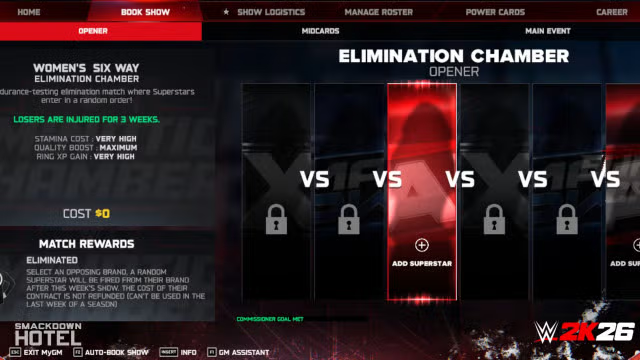
As players progress through their season, they’ll notice that new PLEs have been added the mix, with the larger cross-brand PLEs supporting 6 and 8-way matches, and overall a larger pool of match types available during PLEs.
This is the list of Pay Per Views / Premium Live Events that you can encounter in the WWE 2K26 MyGM's calendar:
- Backlash
- Clash in Paris NEW
- Crown Jewel NEW
- Hell in A Cell NEW
- Money In The Bank
- Battleground NEW
- Evolution NEW
- Great American Bash NEW
- Halloween Havoc NEW
- Night of Champions NEW
- No Mercy NEW
- Worlds Collide NEW
- Survivor Series: War Games NEW
- SummerSlam
- Elimination Chamber NEW
- WrestleMania
Note: PLEs will be auto-selected from a pool of available PLEs that fit the appropriate time frame of the season
New Match Types Additions
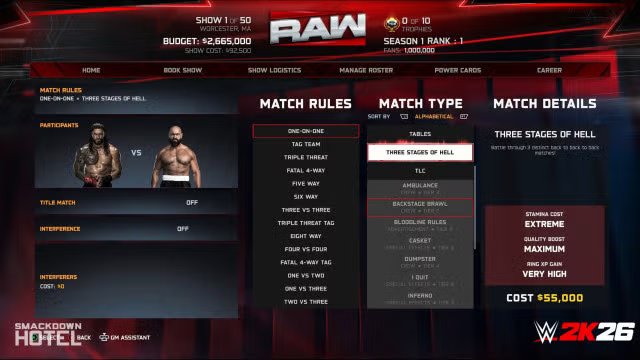
NEW WWE 2K26 has massively increased the supported match types. You are no longer limited to 4-way matches. The following match rules are now also available in GM:
- 5-Way
- 6-Way
- 8-Way
- 3 vs 3
- 4 vs 4
- Triple Threat Tag
- Fatal Four Way Tag
- 1 vs 2
- 1 vs 3
- 2 vs 3
In addition to all the existing match types, MyGM in WWE 2K26 will also feature the following match types to choose from:
- Ladder Match
- Battle Royal
- Bloodline Rules
- I Quit
- Inferno
- Dumpster
- Three Stages of Hell
- Elimination Chamber: exclusive to the dedicated PLE
Intergender matches are now also supported, which opens up even further options when booking shows. Intergender matches do require small additional costs to utilize, so players will want to be strategic with how and when they put on shows.
When choosing your match type, pay attention to the money, stamina costs, and benefits. For example, Steel Cage matches grant a +50% chance of increasing rivalry level - while Steel Cage matches immediately resolve any rivalry. While special matches provide better ratings, they also cost more in terms of budget and stamina of the involved Superstars.
You can also decide whether or not to put a Title on the line, and if you want to book an Interference from a certain superstar (Run-In) or interfere directly with your GM - which also costs some money.
Interferences are a good way to level up rivalries. Using a Run-In interference will result in the match ending in a DQ, and will limit your options to only simulating that match. GM Interferences provide a nice bonus but cause the interfered superstar to be quite upset - so book carefully!
Title matches will cost your superstars more stamina but also put on a bigger show!
Note: The Royal Rumble match still appears to be missing from the MyGM Mode.
Match Booking Tips
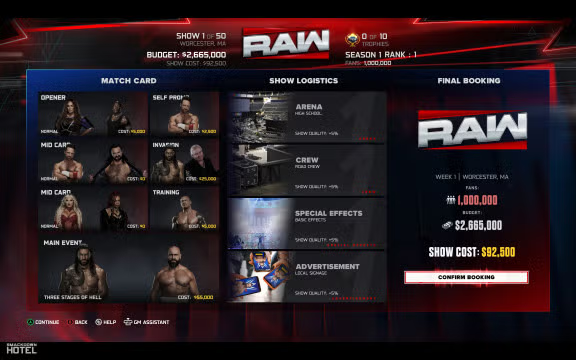
As mentioned before, Classes and Roles play a factor when it comes to the quality of the matches and the overall show.
Superstars that mix well together and will have better matches when put against each other are:
- Giants vs. Cruiserweights
- Fighters vs. Bruisers
- Specialists work well with anyone
- In general, Faces (Fan Favorites) against Heels (Rule Breakers)
You can also stack these for even better results, for example by putting a Fan Favorite Cruiserweight against a Rule Breaker Giant.
A Superstar's Popularity and Ring Level will also determine how well they draw crowds and viewers. Through a season you can raise your Superstar's Popularity and Ring Level by putting them in matches, doing promos, training, or using Power Cards. The higher their popularity and ring level, the better their matches will be rated.
And of course, booking more exciting match types such as Hell in A Cell, TLC, Extreme Rules, etc. will lead to higher show quality and better ratings - but you need to have enough budget to book them.
To get the best match card quality score, you'll want your matches to try and follow the expected drama curve as closely as possible. The drama curve consists of a strong opener, a weaker second match, then an increase in performance for the subsequent matches, with the highest point reached in the main event.
Booking Promos
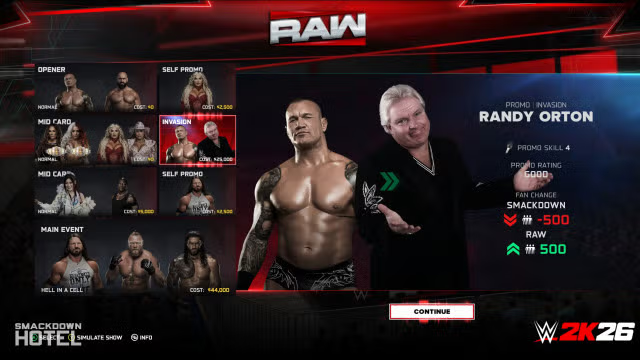
Promos are a nice way to get more exposure to your Superstars. You can set up a range of promo types, each with a different cost.
Here is the full list of Promos in WWE 2K26 MyGM with their respective descriptions and costs:
| Promo | Cost | Details |
|---|---|---|
| Self-Promo | $2,500 | Features only 1 superstar, and can increase or lower their popularity based on performance |
| Call-Out | $3,000 | Chance to begin a 1v1 Rivalry or increase the level of an existing one |
| Role Change | $10,000 | Allows you to turn a superstar from face to heel, or vice-versa |
| Advertising | $0 | Generates extra revenue, but could decrease a superstar's popularity in case of poor performance |
| Charity | $10,000 | Generates a small bonus of fans for the week, and can increase the superstar's popularity |
| Class Change | $10,000 | Allows you to change a superstar class to their bonus perk class |
| Training | $5,000 | Increase the selected superstar's Ring XP |
| Tag Team Call-Out | $3,000 | Chance to begin a Tag Team Rivalry or increase the level of an existing one |
| Invasion NEW | Send a star to attack another brand and steal fans. Effectiveness depends on promo skill. |
You can of course determine the superstars involved in promos. Superstars involved in promos will only recover half the stamina that they would, had they rested that week.
NEW In WWE 2K26, you can now also book a Superstar for both a promo and a match on the same show, with a higher stamina cost.
Note: Promos will always be simulated - you won't be able to watch them when running the show.
Commissioner Goals & Challenges
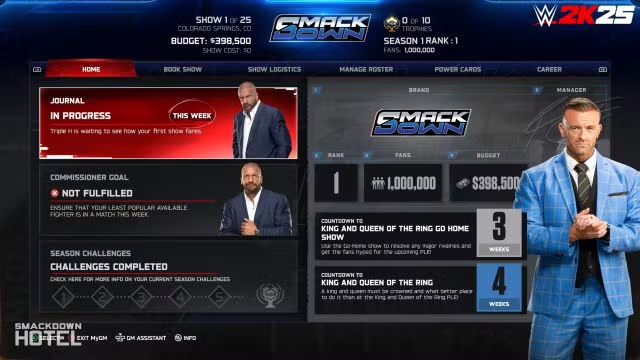
Before booking a show, it's recommended to check the weekly Journal and Commissioner Goals from Triple H. which can be found on the Home screen.
These provide you with guidance to book your show, such as tips on how to improve an active rivalry or suggestions to avoid booking a certain talent so they can rest up from injuries.
You can choose to follow these objectives or not - but Triple H will reward you with unique and rare Power Cards if you complete the goals.
In your Home screen, you'll also find Promises you've made to your Superstars, Free Agent Statuses, Show Notes, and your overall Career Progress.
WWE 2K26 MyGM: Show Logistics
As mentioned, budget is very important in WWE 2K26 MyGM. Not only you will need it to sign Superstars and book various match types, but also to manage show logistics.
Each week, you have the choice to pick what Arena you want to host your show, the kind of Crew you want for your show, the show's used Special Effects, and the method of Advertising you use to let your virtual fans know about your show.
The better option you use in each category, the more money you need to spend on producing the show, but the better improvement you'll see in the Show Quality for that week. You unlock more arenas and options as you progress through the weeks.
Each of the four categories has six different options: the free option will be selected by default until you change it. Not all options are available from the start - more will unlock as the season progresses. And most of the time, you'll need to pay a 1-time fee to unlock that option for the first time.
When selecting an option, pay attention to the costs and descriptions! You'll get bonuses and benefits if you book correctly for your option.
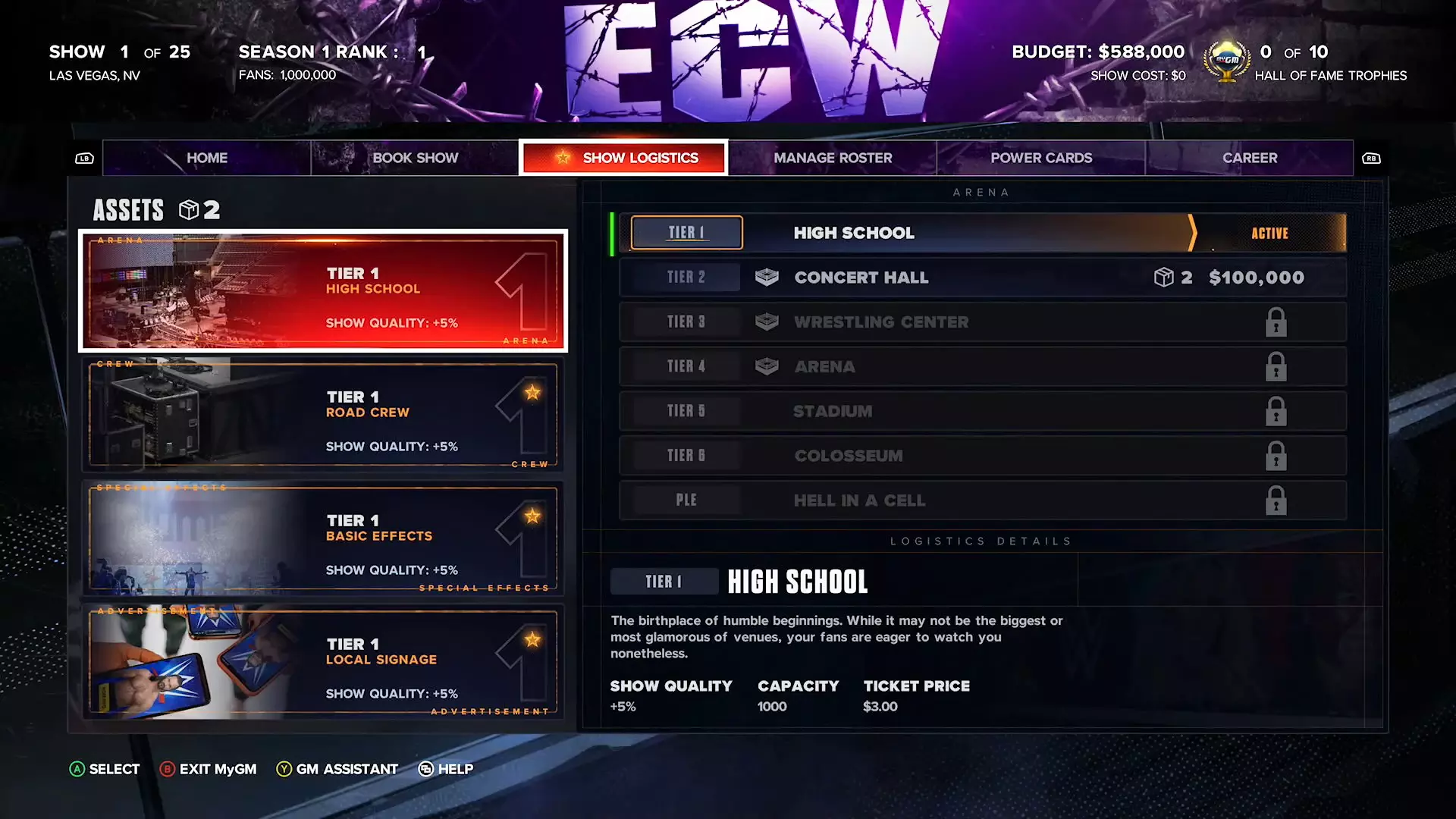
Available Arena Venues
Below you find all the available MyGM arena venues known so far, along with their Cost, Capacity, and Benefits.
You can save money by booking your show to take place in small arenas, such as a high school gym - however, this will result in lower revenue due to less capacity and lower ticket prices.
On the other hand, while bigger arenas cost more, they lead to more revenue via ticket sales, and also give a bigger boost to show quality.
| TIER | Arena | Cost | Benefits |
|---|---|---|---|
| 1 | High School Gym | $0 | Capacity: 2,000 Ticket Price: $1.50 Show Quality: +5% |
| 2 | Concert Hall |
$100,000 | Capacity: 5,000 Ticket Price: $2.00 Show Quality: +8% |
| 3 | Wrestling Center |
Capacity: 10,000 Ticket Price: $2.50 Show Quality: +11% |
|
| 4 | Arena |
Capacity: 20,000 Ticket Price: $3.00 Show Quality: +14% |
|
| 5 | Stadium |
Capacity: 30,000 Ticket Price: $3.50 Show Quality: +17% |
|
| 6 | Colosseum |
Capacity: 50,000 Ticket Price: $4.00 Show Quality: +20% |
|
| PLE | Current PPV Arena | $50,000 | Capacity: +5,000 Ticket Price: +$2.00 Show Quality: +5% |
WWE 2K26 MyGM: Manage Roster
Superstar Info
When playing through MyGM Mode, you can manage your current roster at any time via the "Manage Roster" tab.
In the Manage Roster section, you can see everything you need to know about your Superstars. If you select a Superstar, you can get more in-depth information about them, including their Popularity, Ring XP Level, current morale, their match specialty, and mic skill.
This section also allows you to release superstars from your current roster, which gives you a bit of a refund on their contract.
Ring Experience
With the Superstar Journey system in WWE 2K26 MyGM, as Superstars participate in matches and promos (there's a Training Promo), they now earn XP and Level Up their Ring Experience, which unlocks unique perks that you can assign to them.
With enough experience, Superstars will earn higher ranks. Superstars have the opportunity to earn up to 6 different ranks throughout their career. These ranks include: "Rookie", "Established", "Renown", "Icon", "Legend", and "Immortal". Some Superstars are naturally gifted and will start higher than others but that doesn't mean rookies aren't worth your time.
As Superstars earn higher ranks they will unlock perks allowing each superstar to become truly unique. At each new rank you'll be able to select between 1 of 2 powerful Perks. Perks grant superstars passive abilities that may benefit themselves, your show, or your brand as long as they are on your roster.
When selecting perks keep in mind that unlocked perks are permanent! There's no going back once they are selected. This means if a Superstar leaves your brand and is picked up by another brand or vice versa, the new brand will be able to benefit from any Superstar perks previously unlocked.
Talent Scouts & Contracts
This is the section dedicated to hiring any available Free Agents, Local Talents, and Legends.
Just like last year, WWE 2K26 MyGM Mode features a Talent Scouts system. Each week you'll be granted 5 talent scouts you can utilize to find the best Superstars that fit the needs of your roster.
Here you'll find search criteria to utilize when searching for Superstars. These include rank, gender, role, class and promo skill. The more specific your search criteria, the more talent scouts will be required when searching for Superstars. Once all your talent scouts are used, you'll have to wait a week or use power cards to earn more talent scouts.
Searching for Superstars requires a variable amount of talent scouts and cash. Once you have finalized your search criteria, put your talent scouts to work. If you have the required amount of cash and talent scouts they will attempt to return with any talent that meets your search criteria.
If any Superstars meet your search criteria they will appear here! You'll then have the option to view each one individually and sign them to your brand for an agreed-upon contract price and duration.
Once their contract expires, you'll need to renew it if you want to keep them. Of course, signing Legends to a contract is much more expensive than regular Free Agents or Local Talents.
Note: The pool of available talents will be randomized each week. You'll also be allowed to view 4 lower-level Superstars for free.
Rivalries
As superstars interact with each other on your show, they'll start to build a rivalry. The more these superstars interact with each other, the stronger their rivalry will become.
Rivalries can be started and advanced with run-ins, call-out promos, and by putting rival superstars in the same match. Having strong rivalries on your show will improve match rating, show quality, and lead to better fan reactions and revenue.
You can see which wrestlers are in a rivalry when selecting people for a match, as each rivalry is shown on the character's card.
Rivalries start at Level 1 and max out at Level 4. The higher the rivalry level, the higher your match will be rated.
Be aware that Level 4 rivalries can only end at a PPV/PLE or at a Go Home Show (which is the weekly show before the PPV/PLE). If you let a Level 4 Rivalry carry on for too long, the fans may get tired and the match ratings will reflect that.
Morale, Injuries, and Messages
In MyGM mode, there is also an in-game messaging system called WWENet, which allows you to interact with Superstars, as well as with commissioner Triple H, and you can reply using multiple-choice answers.
Superstars can message you with requests, such as asking you to book them on shows, or demanding a title shot.
A Superstar's morale can be affected by how they're booked, how you treat them, and whether you agree to their requests and keep any promises you made. It's your responsibility to keep Superstars happy and their morale high - if you don't want them to jump to the rival show.
If a Superstar's stamina gets too low, they may also get injured, so be on the lookout for that as well.
NEW With the 50-week season in WWE 2K26, stamina becomes a major hurdle. After Week 25, each brand can select up to 6 superstars to receive a massive boost to their stamina and morale, helping you prepare for the road to WrestleMania.
Trades With Other Brands
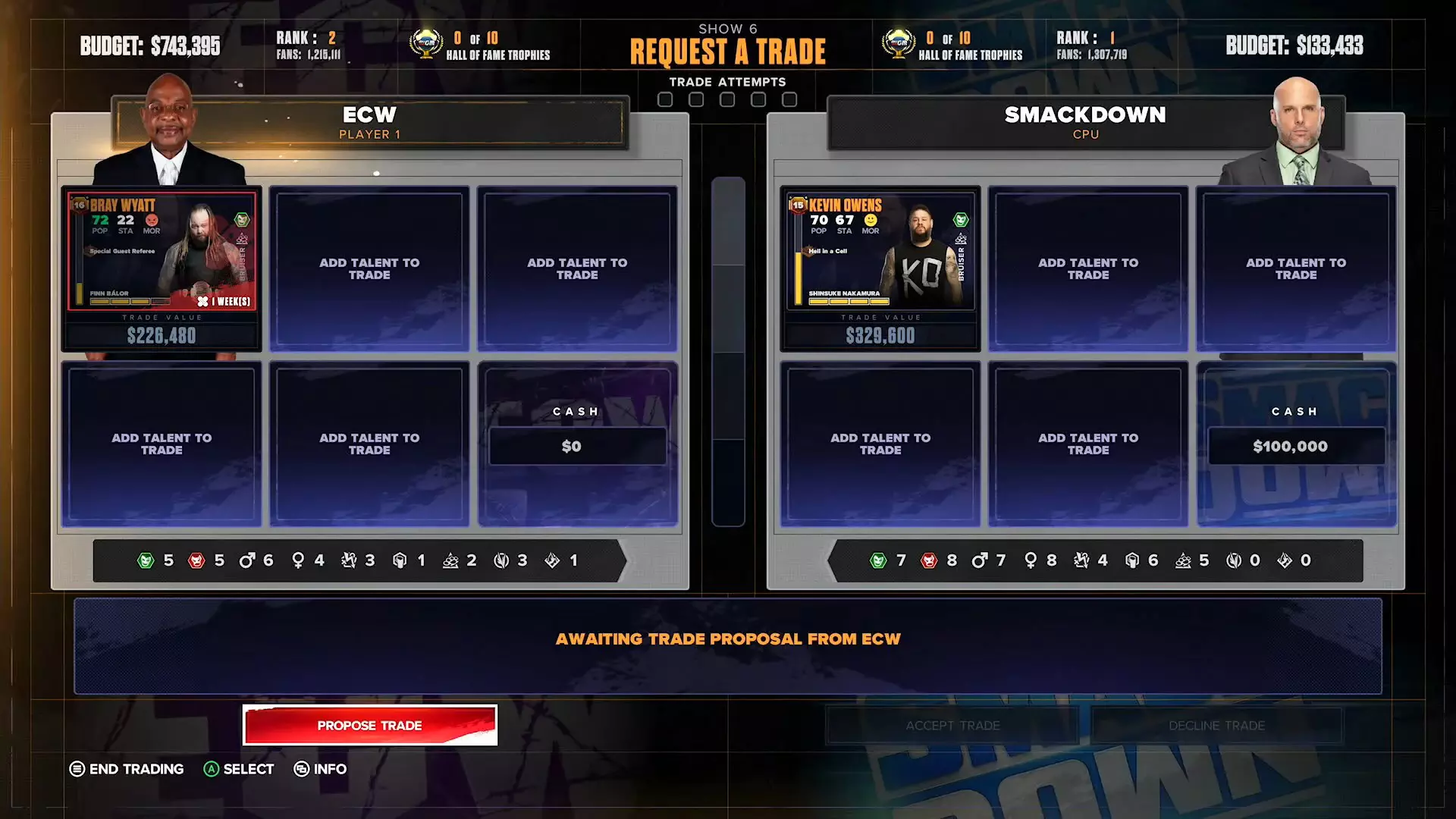
In MyGM, you also have the ability to trade superstars with other brands.
After each PPV/PLE, each brand will have the opportunity to trade cash or superstars with other brands, whether AI-controlled or player-controlled. You may only trade with one brand at a time but if more than 2 brands are available you can swap between them to select the one you want to trade with.
When trading against a human player you can make the deal in real time between yourselves. Each brand may select up to 5 Superstars for a single trade plus any cash you might want to add to sweeten the pot. Additionally when a superstar is added to the trade you'll find their trade value, which can help determine a fair trade. Keep in mind this does not include personal values other brands take into account such as titles, rivalries etc. So if they're asking for more, it'll be up to you to tip the scales in your favor.
NEW During trade weeks, in WWE 2K26 you can now trade Power Cards with other GMs. Two of the five available trade slots are now dedicated to Power Cards, allowing you to swap a strategic boost for a superstar you desperately need.
You are given 5 trade attempts per PLE, so use them or lose them. Every trade proposal you make will use one of your trade attempts. Once they are all used, you won't be able to make any additional proposals until after the next PLE.
WWE 2K26 MyGM: Power Cards & Shake Ups

In MyGM Mode, Power Cards are gameplay boosts that can be used to increase the ratings of your matches - or even to affect the rival show.
You can buy Power Cards by spending money from your budget or obtain them by completing Commissioner Goals. The store will include 3 random power cards every week, so keep an eye out for anything that could help you.
These can also include things like Fixing a Match so a certain superstar wins, or giving them some rest time in a Health Spa to recover their stamina. You can have multiple of the same power card in your inventory.
After some Pay Per Views / Premium Live Events (PLE), you'll be asked to choose a Shake Up. These modify your season in new and exciting ways. Shake Up effects can activate instantly, last for a set number of shows, or even the rest of the season!
WWE 2K26 MyGM: Running Your Show

After finalizing and confirming the booking of your show, you have the option to Play, Simulate or Spectate the matches you set up each week.
If you enter Spectator Mode, you can watch the match live, with the game giving you the option to cycle between unique camera angles. On the other hand, if you're in a rush, you can even simulate the entire show by pressing Triangle / Y.
It's important to note that playing the matches won't make much difference in the match quality rating, compared to simulating the match. The match rating is not much affected by the actions that occur in the ring, but more by various factors such as the Popularity, Ring XP Level, Classes, and Roles of the superstars involved, as well as the Match Type.
Unlike WWE Universe Mode, you can't choose the winner when simulating a match - unless you have the "Fix Match" power card. Regarding Promos, these will always be simulated, there is no way to spectate or play the promos in MyGM Mode.
WWE 2K26 MyGM: Reports & Ratings
Match Report & Post-Show Breakdown
After each match, you will be taken to a Post-Match Report Screen, which gives details on how the match went down, the Viewer's Match Rating, and notes whether or not a rivalry has started, or the level that the rivalry is at.
Once your show has finished, you will also see your rival show get simulated, and you will then be presented with a "Drama Curve" Breakdown, indicating how both shows performed alongside each other.
Week Report
At the end of the week, you are given an End of Week Report where you can see the overall Show Quality and Rating Score, how it was received by the fans, and how it impacted your Viewership and Revenue compared to previous weeks, as well the Fan Retention Rate.
Not all new fans gained will stick around: the retention rate will vary from week to week and that will determine how many fans you'll carry over from the previous week.
You can gain fans and revenue from promos and advertisements, shake-ups, specific match types, and power cards. Keep an eye out for messages from the commissioner, he'll let you know if the retention rate is going to rise or drop in the coming weeks.
On the right side of the screen, you will see a Social Media feed with feedback from Superstars and Fans, either talking about what was great about the show, or what could be improved next week.
Fan feedback can reveal a lot of useful information to you, such as a superstar's match specialty, or a tag team's chemistry! If you miss these, you can find them in your journal.

Ratings & Fans
Finally, on the next screen, you're presented with a ranking screen that shows which brand is currently on top, along with the amount of cash and fans each brand has.
Your current rank, revenue, and the number of fans can also be seen at any time from the Home Screen and the "Season" tab of the Main Menu.
Keep in mind that you don't have to outdo the other brand every single week. A big part of this job is building towards a killer PPV/PLE - those are where the biggest wins can be made. So pace yourself, build rivalries, and make sure your top stars can take part in your most important shows.
Your goal to win MyGM Mode in WWE 2K26, is to be the brand with the most fans and revenue after the final show - WrestleMania.
Career Progress and WWE Hall of Fame

It's everyone's dream to someday make it into the WWE Hall of Fame. To get there, you'll need to prove that you have what it takes to manage your talent, money, and brand to the top.
Trophies are earned by completing Career Achievements and Seasonal Challenges over the course of your GM Career.
You can earn up to 20 seasonal challenges per year. For every 5 you complete, you earn a Hall of Fame trophy. These, along with the new Slammy Awards, are your ticket to GM immortality.
The Hall of Fame induction ceremony will occur for all brands at the end of a Season when any GM has collected the required number of trophies. All GMs will be entered into the Hall of Fame and ranked by the selected win condition. Ties are broken by the most cash.
Entering the Hall of Fame will allow you to continue playing or retire your save file.
WWE 2K26 MyGM Career Achievements List
- Revenue Tier 1: Earn $1.5m in Lifetime revenue
- Revenue Tier 2: Earn $10m in Lifetime revenue
- Revenue Tier 3: Earn $20m in Lifetime revenue
- Revenue Tier 4: Earn $50m in Lifetime revenue
- Revenue Tier 5: Earn $100m in Lifetime revenue
- Fans Tier 1: Reach 4.000.000 total fans
- Fans Tier 2: Reach 6.000.000 total fans
- Fans Tier 3: Reach 8.000.000 total fans
- Fans Tier 4: Reach 9.000.000 total fans
- Fans Tier 5: Reach 10.000.000 total fans
- Season Rank Tier 1: Finish 1 season ranked in 1st place
- Season Rank Tier 2: Finish 3 seasons ranked in 1st place
- Season Rank Tier 3: Finish 5 seasons ranked in 1st place
- Season Rank Tier 4: Finish 7 seasons ranked in 2nd place or better
- Season Rank Tier 5: Finish 10 seasons ranked in 2nd place or better
This is everything you need to know about MyGM Mode in WWE 2K26 - good luck in your venture to become the best General Manager on your way to the Hall of Fame!
Do you have any more questions on WWE 2K26 My GM? Let us know in the comments below.
For more WWE 2K26 Guides check out the main WWE 2K26 section and the WWE 2K26 Roster Page!

